
ElevenLabs Temporary Email: Sign-Up and Unusual Activity Explained
Trying ElevenLabs and want to keep your personal inbox separate? Tempgmail.io provides a temporary Gmail address for receiving email. It may help you receive a sign-up verification message if ElevenLabs accepts the address. However, email acceptance and permission to use the Free plan are separate checks: a new address does not remove account or network restrictions.
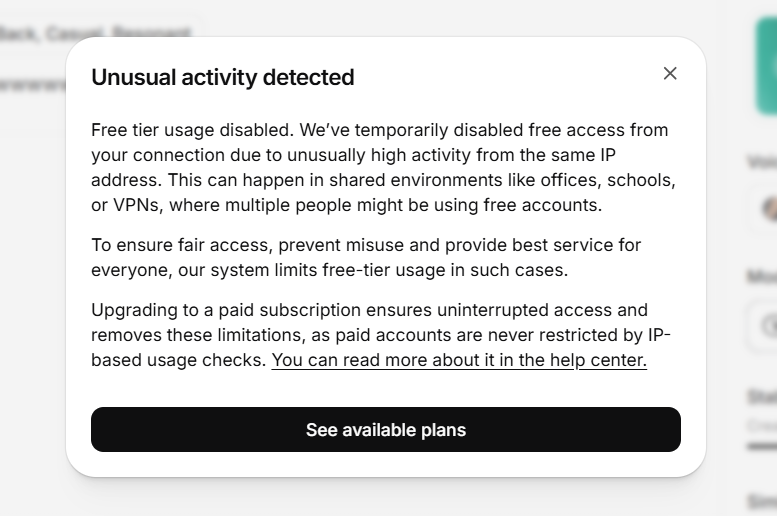
What the screenshot actually shows
The warning explains that unusually high activity from the same IP address has disabled free access. Shared offices, schools and VPN connections can put several people behind one public IP. This is a usage restriction, not an email verification error.
ElevenLabs’ account documentation describes the same problem and limits free accounts to one per user and IP. Even a successfully verified email does not guarantee free-tier access.
How Tempgmail.io helps with email verification
Tempgmail.io receives messages through Gmail address variants rather than a separate disposable-mail domain. This can be useful for a short, permitted trial without putting a personal inbox on the registration form. Acceptance still depends on ElevenLabs, and we have not verified unrestricted access with this screenshot.
A Gmail address supplied by our tool is a receiving inbox, not a Google account you can sign into. Choose email registration rather than Sign in with Google.
Receive a verification email in five steps
- Open Tempgmail.io using the inbox button above, copy the displayed address and keep the tab open.
- Visit the official ElevenLabs website. If email registration is available and the address is accepted, enter it and choose a unique password.
- Return to the temporary inbox and wait for the verification message. Compare the address if no message arrives, and request one fresh email if needed.
- Check the message and the destination of its link, then complete verification on the official ElevenLabs site before the inbox expires.
- Check your account’s plan and access status. Verification confirms receipt of email; it does not remove free-tier restrictions.
Email rejected, email missing, or free tier disabled?
| What you see | What it means | Next step |
|---|---|---|
| Email address rejected | The registration form does not accept the address. | Use an email address you own that ElevenLabs accepts. |
| Verification email missing | You have not received the confirmation message. | Check the address and session timer; use your own inbox if delivery fails. |
| Unusual activity warning | Account or network usage triggered a free-tier safeguard. | Review ElevenLabs’ official guidance and ask support about your situation. |
Can a temporary email remove the restriction?
No guarantee is possible. Changing an email does not change your public IP or reset a platform’s safeguards. Do not create replacement free accounts to collect extra credits or evade a restriction. If access is disabled, follow ElevenLabs’ guidance; review its paid options if they meet your needs. Tempgmail.io is independent of ElevenLabs.
Keep access to an account you want to use again
Our public inboxes are temporary and may be shared. They are unsuitable for private projects, purchases, password recovery or an account you need to keep. If you decide to continue, change the account email to an address you control and complete any confirmation while the temporary inbox is still available. Use your own email from the start for long-term work.
Open the tool and check the address and timer before sending a message.
Open a temporary inbox